localhost 3000 VS 5173 | Complete Troubleshooting Guide
The frustration of typing http://localhost:3000 or http://localhost:5173 into your browser only to be greeted by a connection error page is a feeling every developer knows intimately. This comprehensive guide provides systematic solutions for React, Node.js, Docker, and browser-related issues.
Introduction: The Universal Development Challenge
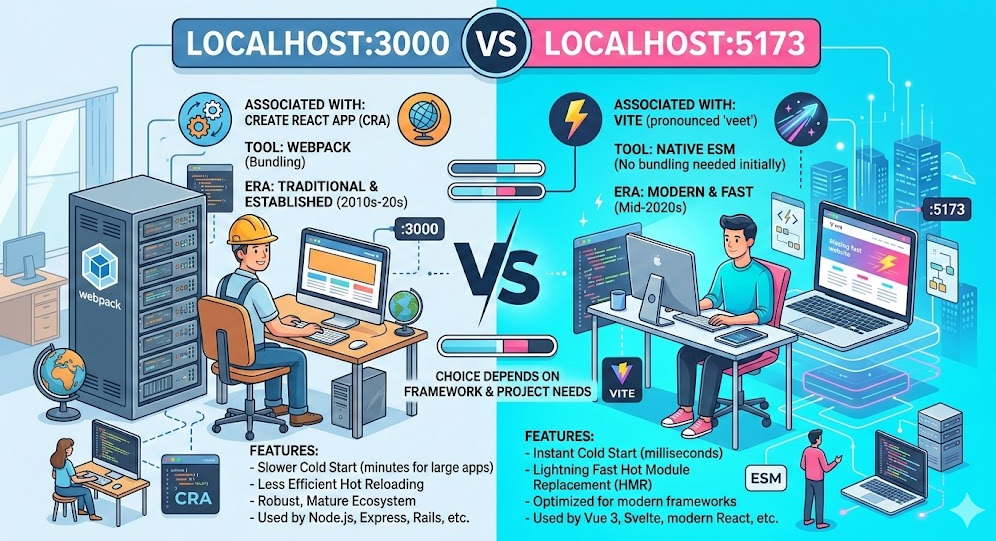
In today's world of web development, two numbers frequently appear in our browser address bars: localhost:3000 and localhost:5173. Whether you're creating a React application with Next.js or launching a Vue project with Vite, these two port numbers have essentially become the "default gateways" for front-end development. But have you ever found yourself deep in late-night debugging, staring at them and wondering: Why 3000? And what's the meaning behind the seemingly random sequence 5173?
More importantly, what do you do when you eagerly start your project, only to be greeted by a Port already in use error? Or when you're integrating an OAuth login and the authentication fails due to subtle differences between localhost and 127.0.0.1? Do you truly understand what's happening behind the scenes?
Today, we'll go beyond just history. From a practical, hands-on perspective, we'll thoroughly unravel the stories behind these two ports, the pitfalls associated with them, and the elegant ways to "tame" them.
Part I: The "Legacy" of Ports: Unraveling the Origins of 3000 and 5173
1. 3000: An Unintentional "Hello World" Standard
If you think the choice of 3000 was the result of careful technical deliberation, you might be disappointed. Its popularity is more like a case of word-of-mouth propagation in the open-source world.
The story traces back to the golden era of Ruby on Rails. As one of the most popular web frameworks at the time, Rails needed a number greater than 1024 – a "non-privileged port" – for its development server, a user-friendly choice as ports above 1024 don't require sudo permissions. The creator of Rails, David Heinemeier Hansson (DHH), or his team, settled on 3000. It was simple, easy to remember, and not commonly used by system services at the time.
Shortly after, Node.js and Express rose to prominence in the early 2010s. To help beginners get started quickly, the official documentation featured a classic code snippet:
app.listen(3000, () => console.log('Server running on port 3000'));
It was this single line of code that influenced an entire generation of developers. Tutorials, blog posts, bootcamp assignments – they all replicated this snippet without a second thought. Subsequent frameworks like React and Next.js, aiming to reduce the cognitive load on developers, also adopted this "convention." So, 3000 isn't a technically optimal solution, but rather a "sociological" product of developer habits.
2. 5173: A Programmer's Romantic "Self-Reference"
In contrast, the birth of 5173 is full of geeky humor. With the advent of the Vite build tool (created by Vue.js author Evan You), a default port was needed for the new generation of front-end tooling. This time, however, the team didn't want to just follow the crowd and choose 3000 or 8080. So, they embedded an Easter egg that only developers could appreciate.
How do we interpret 5173? The widely accepted explanation points to a bit of "self-interest" from the Vite team: 5173, visually or through a number puzzle, can be deconstructed as "V" (5) and "ITE" (through some mapping), thereby spelling out "VITE". This is classic programmer humor – encoding the product's name into the port number, which not only avoids conflicts with common ports but also adds a touch of distinctiveness.
Part II: Theory vs. Reality: Do You Really Know How to Use These Ports?
Scenario 1: The "LAN Fog" of Cross-Device Debugging
When you start a Vite project (on port 5173), the terminal usually displays two addresses:
http://localhost:5173/http://192.168.1.x:5173/
Many beginners get confused: if both work, why use the IP address?
- localhost: This uses the virtual loopback interface. Traffic never goes through your physical network card, making it extremely fast, and it works even without an internet connection. However, it's only accessible from your own machine.
- LAN IP: This uses the physical network card, allowing access from phones, tablets, or colleagues' computers on the same Wi-Fi network.
The Pain Point: If you find your phone can't access the page via the IP address, don't immediately panic. 90% of the time, the reason is that the development server is only bound to 127.0.0.1 by default.
In Vite or Webpack, you need to force the server to listen on all network interfaces:
// vite.config.js
export default {
  server: {
    host: '0.0.0.0', // Listen on all addresses, including LAN
    port: 5173,
  }
}
After making this configuration and ensuring your firewall allows the port, your phone should be able to access it.
Scenario 2: The "Same-Origin Policy Hell" of OAuth Logins
This is one of the most agonizing scenarios. You configured a redirect URI in the Google Cloud Console or WeChat Open Platform: http://localhost:3000. Then you start your Vite project, but it defaults to running on http://127.0.0.1:5173. You click login, it redirects, and then – redirect URI mismatch error.
Why? Strictly speaking, from the browser's same-origin policy perspective, localhost and 127.0.0.1 are considered different origins. To make matters worse, modern operating systems (like macOS or Windows 10+) often prioritize IPv6. This means localhost might be resolved to ::1 (the IPv6 loopback address), instead of the familiar 127.0.0.1.
Solution: You need to force Vite not only to listen on the correct port but also to use the correct hostname.
// vite.config.js
import { defineConfig } from 'vite';
import dns from 'dns';

// Key: Force Node.js to resolve localhost to an IPv4 address (127.0.0.1)
dns.setDefaultResultOrder('verbatim');

export default defineConfig({
  server: {
    host: 'localhost', // Explicitly specify the host
    port: 3000,        // Force the use of port 3000
    strictPort: true,  // If 3000 is in use, exit instead of auto-incrementing
  },
});
By using dns.setDefaultResultOrder('verbatim'), we bypass the system's preference for IPv6, ensuring the service runs on 127.0.0.1:3000, which perfectly matches the OAuth configuration.
Part III: Digging Deeper: What Happens When the Default Port is Busy?
This is arguably the most common error in development: Error: listen EADDRINUSE: address already in use :::3000.
Cause: Another process (maybe a Node process you forgot to close earlier, or a completely different piece of software) is already using that port.
Traditional Solutions:
- Mac/Linux: Run
lsof -i :3000to find the PID, thenkill -9 PID. - Windows: Run
netstat -ano | findstr :3000to find the PID, then terminate it in Task Manager.
Advanced Mindset: Embrace Change – Since a port is just an identifier, we don't have to stubbornly stick to 3000. Modern tools like Vite and Next.js are smart enough to prompt you or automatically increment the port (e.g., to 5174) when the default is busy.
But if you want to get fancy, you can set your own "signature port." Use your birthday, lucky number (as long as it's between 1024 and 49151). Customize it in your package.json scripts:
"scripts": {
  "dev": "vite --port 2501 --host"
}
Part IV: From Development to Production: The "Disappearing Act" of Port Numbers
After all this talk about ports during development, we must touch on the production environment. Never expose 3000 or 5173 directly in production.
In a production environment, the best practice is to use a reverse proxy (like Nginx, Caddy). Your front-end application (whether SPA or SSR) should listen on a local port (e.g., 3000). Then, Nginx listens on port 80 (HTTP) and 443 (HTTPS) and forwards requests to that local port.
Typical Architecture:
- User visits
https://example.com(port 443). - Nginx receives the request. If it's for a static asset, it returns the built file directly. If it's an API request, it forwards it to the backend on, say, port
8080. If it's a page request, it forwards it to the frontend on port3000. - Externally, the user only sees a standard web port. Internally, each service works in its own "numbered room."
Full-Stack Development Tip: If you're using React + Spring Boot, with the frontend on 3000 and the backend on 8080 during development, avoid hardcoding http://localhost:8080 in your frontend code to prevent CORS issues. Always configure a proxy:
// vite.config.js
export default {
  server: {
    proxy: {
      '/api': {
        target: 'http://localhost:8080',
        changeOrigin: true,
      }
    }
  }
}
Part V: High-Frequency FAQ: Solving Your Final Pain Points
Why is my localhost not working?
Localhost may stop working due to port conflicts (another app using port 3000), server misconfiguration (listening on wrong interface), firewall blocking connections, Docker network issues, or browser security policies (HSTS/cache problems).
How to enable localhost 3000?
To enable localhost:3000: 1) Start your development server (npm start, node server.js), 2) Ensure it listens on 0.0.0.0:3000 not just localhost, 3) Check firewall allows port 3000, 4) For Docker, verify port mapping (-p 3000:3000) and HOST=0.0.0.0.
How to check if localhost 3000 is running?
Use lsof -i :3000 (macOS/Linux) or netstat -ano | findstr :3000 (Windows) to check if something is listening. Test with curl -I http://localhost:3000 or telnet localhost 3000. Check terminal for server output.
How to fix localhost problem?
Systematic fix: 1) Kill port conflicts, 2) Verify server config listens on 0.0.0.0, 3) Clear browser HSTS/cache, 4) Check Docker port mapping, 5) Test with 127.0.0.1:3000, 6) Disable firewall temporarily for diagnosis.
Why is my React app not loading on localhost:3000?
React app may not load due to: 1) Port 3000 already in use, 2) Proxy configuration errors, 3) Dependency conflicts, 4) Browser cache/HSTS forcing HTTPS, 5) Firewall blocking Node.js. Try incognito mode, clear cache, or use PORT=3001.
Conclusion
From the "convention" of 3000 to the "encoded game" of 5173, behind every default port lies the collective habits, wisdom, and humor of the developer community. The next time you see the line Local: http://localhost:5173/ appear in your terminal, I hope you see it not just as a sign of a successful run, but also as a small annotation on the evolution of technology and developer culture.
Understanding the origins and implications of these "defaults" will help you, when faced with port conflicts, authentication errors, or cross-origin issues, to move beyond just "turning it off and on again." You'll be able to accurately pinpoint and solve problems like a true engineer.
After all, the devil is in the details, and excellent developers often see the history and logic hidden within them.

About me
Alex Rivera is a back-end engineering expert and professor at the University of Pennsylvania and Cornell University.